We use cookies
Essential cookies keep facy.ai working. With your permission we also use analytics and advertising cookies to understand how the site is used and to measure our ads. Privacy Policy
Multiple Face Swap
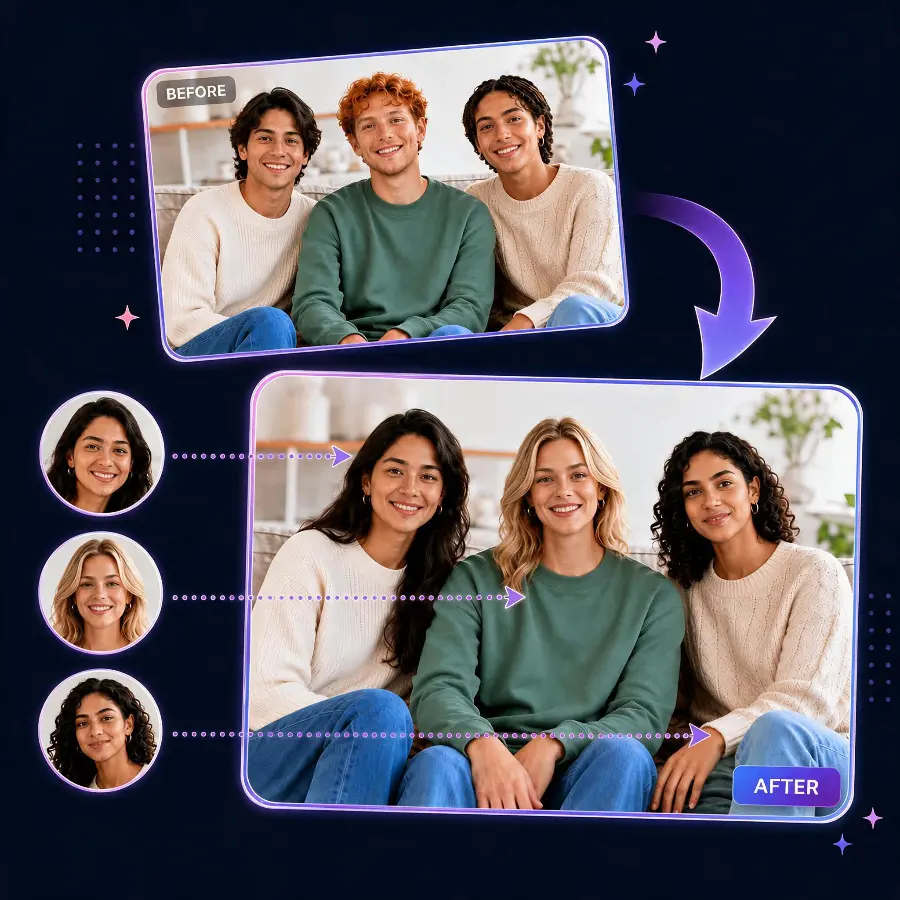
Swap multiple faces in one photo with AI — 100% free, all you need is a free account. Upload a group photo, pick a new face for each person, and download one realistic result.
- 100% free — all you need is a free account, no credit card
- Swap several faces in one photo — one result, one download
- Automatic face detection: every person gets their own card
- You choose which faces change — the rest stay untouched
- Privacy-first: uploads and results are auto-deleted
What Our Users Say
"The realism of face expression, 99,9% identical in real life"
"I love and enjoy this. Hope it stays free always."
"I have tried a lot of sites. And this really the best."
"son una maravilla, saludos"
"Geat! I'love'it"
"Good"
Multiple Face Swap AI: Swap Multiple Faces in One Photo for Free
Need to change more than one face in a picture? Our multiple face swap tool detects every face in your photo automatically and lets you assign a different replacement face to each person — then generates a single, realistic result. It's completely free: all you need is a free account — no credit card, no hidden costs. It's the fastest way to swap multiple faces in one photo, whether that's a group shot, a couple's picture, or the whole family. Prefer to change just one face? Our single face swap works instantly with no account.
Every face, detected automatically
Upload one photo and the AI finds up to 20 faces in it. Each detected face appears as its own card, so you always know exactly which person you're swapping — no manual selecting or cropping needed.
You decide who changes
Assign a new face to one person, a few, or everyone in the picture. Faces you leave alone stay exactly as they were, and the whole photo is processed in one pass for a consistent, natural look.
How to swap multiple faces in one photo
- Sign in with your free account — creating one is free and takes seconds — and upload your group photo, the picture containing the faces you want to change.
- Let the AI detect the faces — every person in the photo gets their own card in seconds.
- Pick a new face for each person — upload one clear portrait per face you want to swap.
- Swap & download — all swaps are applied together and your finished photo appears on this page.
Tips for the best multiple face swap results
Choose the right group photo
Pick a photo where every face is clearly visible — not turned fully sideways, heavily shadowed, or covered. Higher resolution helps the detector find and separate faces that stand close together.
Choose the right replacement faces
Use one sharp, well-lit portrait per person. If a replacement image contains several faces, the AI uses the most prominent one — a single-face photo removes the guesswork.
What you can do with multiple face swap
👨👩👧 Family & group photos
Update everyone in one shot — perfect for holiday cards and reunion pictures.
💑 Couple pictures
Swap both faces in a couple's photo in a single run instead of two separate edits.
😂 Group memes
Put your whole friend group into a famous scene or movie poster at once.
🎉 Party & event photos
Create fun versions of team photos, wedding shots, and celebration pictures.
🎭 Cast swaps
Recast an entire scene — every character gets a new face in one go.
🖼️ Creative projects
Build composites and concepts that need several identities changed consistently.
Multiple face swap FAQ
What is multiple face swap?
How do I swap multiple faces in one photo?
How many faces can I swap at once?
Do I have to swap every face in the photo?
What photos work best for multiple face swap?
Is multiple face swap free?
Can I still swap just one face?
Responsible use & consent
Swapping several faces at once means several people's likenesses are involved. Please only create multiple face swap content when you have permission for the images and every face you use.
- Don't impersonate real people for fraud, harassment, or deception.
- Don't upload private, sensitive, or copyrighted material without authorization.
- Get consent from everyone whose likeness appears in your swaps.
- Never create or share non-consensual intimate imagery.