Face Swap AI
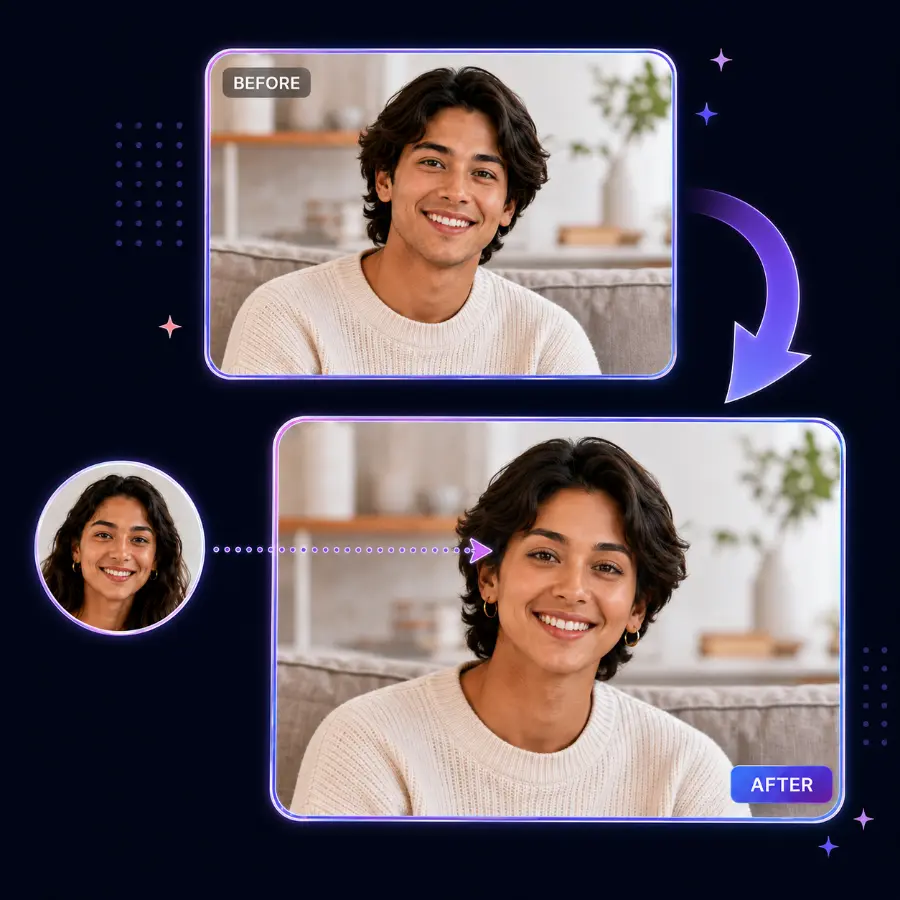
Swap faces on any photo with AI - fast, realistic, and completely free. Upload a face image and a target photo, then download your result.
- 100% free - no sign-up, no credit card
- Realistic results in seconds, right on this page
- Privacy-first: uploads and results are auto-deleted
- Supports JPG, PNG, WEBP, BMP, and GIF up to 20 MB
What Our Users Say
"this was the fastest app to output the result, no signup and no visa"
"Best program for face swap😍😍😍"
"Terrific placement of the face and very good likeness"
"this is a very good face swap app"
"This is so cool, we love it"
"Ye really enjoyed"
Face Swap AI: Swap Faces on Photos Online
Looking for a face swap tool that's simple, fast, and free? This AI face swap tool lets you upload two photos and instantly create a realistic face swap - no sign-up and no credit card required. Your result appears right on this page in seconds, ready to preview and download.
What makes this AI face swap different?
100% free with no hidden costs and no sign-up required. It's privacy-first, too: uploads and results are automatically deleted from our servers after a short time.
Fast, realistic results
Whether you're creating memes, testing creative ideas, or just having fun with friends, our AI face swap technology matches lighting, skin tone, and facial features to produce natural-looking results in just seconds.
How to swap faces on photos
- Upload your face image - the photo containing the face you want to use.
- Upload your target photo - the photo where you want to place the new face.
- Accept the Terms and click "Swap Faces" to start the AI processing.
- Preview & download - your face swap appears on this page; download it to keep it.
Tips for the best face swap results
Choose the right face image
Use a clear, front-facing photo of the face you want to swap, with good lighting and no harsh shadows. Avoid photos where the face is partially covered or obscured.
Choose the right target photo
Pick a photo where the face is clearly visible. A similar face angle and lighting to your source face works best, and higher-resolution images produce more detailed results.
What you can do with AI face swap
😂 Memes & fun
Create hilarious face swaps for social media and group chats.
🎨 Creative projects
Test creative concepts and visualize ideas before committing.
🛠️ Imperfect photos
Fix imperfect photos where someone wasn't looking at the camera.
🎭 Costumes & characters
See how you'd look as a historical figure or movie character.
🎁 Personalized gifts
Create unique, personalized images for cards and gifts.
📱 Social content
Make engaging content for TikTok, Instagram, and more.
Face swap FAQ
What is AI face swap?
How do I swap faces on a photo?
Is face swap free to use?
How long does a face swap take?
What image formats are supported?
What makes a good face swap result?
Is face swap safe and private?
Can I use face swap for commercial projects?
Is face swap legal?
Responsible use & consent
Face swapping can be fun and creative, but it can also be misused. Please only create face swap content when you have permission to use the images and faces involved.
- Don't impersonate real people for fraud, harassment, or deception.
- Don't upload private, sensitive, or copyrighted material without authorization.
- Always get consent when using someone else's likeness.
- Never create or share non-consensual intimate imagery.